


Cool Launcher Pro
4.377.00 Reviews
App Specs
- Version
- 2.0.1
- Updated On
- License
- Free
- Downloads
- 100,000+
- Developer
- Game Studio1314
- Categories
- Personalization
- Platform
- Android
Screenshots
 Analysis by AppCompare
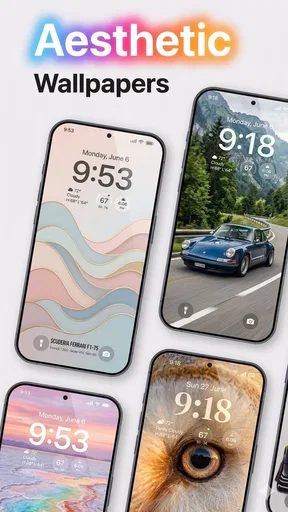
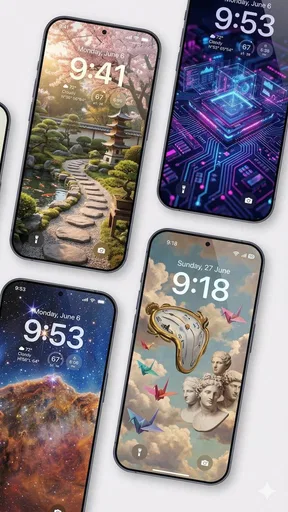
I look at a launcher as more than a coat of paint: it changes how I find things, how much visual noise I see, and how comfortably I can use my phone in different situations. Cool Launcher Pro is a free personalization app from Game Studio1314, with a focus on reshaping the home screen and its look. Its video-wallpaper angle makes it more visually expressive than a plain layout tool, though that kind of movement will not suit everyone. I’d consider it most appealing if you enjoy making a phone feel personal and are willing to spend a little time deciding how you want it to work.
Readability and finding your way around
A custom home screen can be easier to use when the layout reflects your habits rather than a default arrangement. I’d start by putting the apps I reach for most often where my thumb naturally lands, then keep less-used tools out of the way. The launcher’s customization focus can help make that arrangement feel deliberate, but visual polish is only useful if labels and icons remain easy for you to distinguish.
For readability, I recommend resisting the urge to fill every available space. A busy wallpaper, tightly packed icons and decorative theme elements can compete with app names, particularly when you are checking the screen quickly. A calmer background and a smaller set of frequently used shortcuts are usually a better everyday combination than a home screen designed only to look impressive in a screenshot.
Different abilities and everyday contexts
Personalization can support different preferences, but it does not automatically make a phone accessible. Someone who benefits from larger visual targets should check whether their chosen layout gives icons enough room and whether the text remains comfortable to read. People who rely on a consistent arrangement may also prefer to make one change at a time, so they can tell whether a new theme or layout has made routine navigation easier or harder.
Video wallpaper is a particularly personal trade-off. It can make the screen feel lively, but motion may be distracting or uncomfortable for some people, and a moving background can make important icons harder to scan. If you use your phone in bright surroundings, during a quick commute check, or while concentrating on another task, a quieter visual setup may be more practical. I’d treat the wallpaper as decoration, not as the main reason to choose a layout.
Who I’d recommend it to
I’d point this toward people who enjoy arranging their home screens and want more visual character than a standard launcher provides. The app is rated for Teen users, and it has an average rating of 4.0 from around 471 ratings, with more than 100,000 installs. That makes it a recognizable option in the personalization space, though popularity alone cannot tell you whether its style or controls will suit your own needs.
It is less compelling for someone who wants a completely hands-off phone, relies on a familiar system layout, or prefers a quiet screen with no decorative motion. If accessibility depends on a specific, proven interaction or a particular assistive setup, I would check that workflow on the device before making a launcher the center of it. A familiar default interface may be the safer choice when consistency matters more than visual change.
Worth Reading Before You Choose

EA SPORTS FC Mobile 26 Is a Bigger Football Game, but It Takes Time

Flipboard Shows What News Apps Must Do Beyond the Feed

Switching to Android Auto Means Rethinking Your Driving Routine

Google Calendar Makes a Crowded Week Easier to Manage

Ludo King Makes the Most of the Minutes Between Plans

Baby Panda World Brings Quick Play to Modern Phones, but Its Game Library Feels Busy
A practical way to try it
Rather than redesigning everything at once, I’d begin with a small experiment: choose a restrained theme, place only essential apps on the first screen, and use the phone normally for a day. Notice whether you can find calls, messages and navigation tools without pausing to search. Then adjust spacing or appearance if something feels awkward. This simple sequence makes it easier to separate a genuinely useful change from one that only looks appealing at first glance.
I’d also judge the launcher in the conditions where you actually use your phone. Check the home screen one-handed, in a hurry, and in the lighting you typically encounter. If video wallpaper is part of the appeal, try it briefly and see whether its movement competes with icons or makes the screen harder to read. These are practical checks, not claims about a particular accessibility feature; comfort depends on the person, device and chosen design.
First Impressions and Features
When I first installed Cool Launcher Pro, I was immediately impressed by how sleek and intuitive the interface was. It’s got this minimalist vibe, but don’t let that fool you—there’s a ton of functionality packed in there.
The setup process was a breeze. You know how some launchers can be a bit overwhelming with options? Not this one. It guides you through customization without making you feel like you need a degree in computer science. Within minutes, I had a layout that felt uniquely mine.
Customization Galore
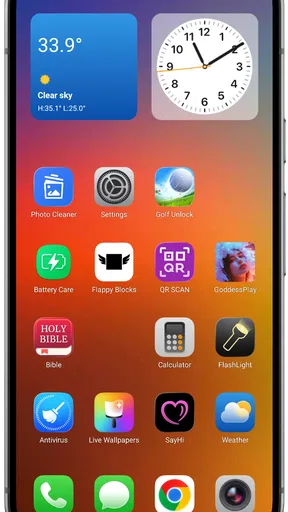
This is where the launcher really shines. The level of customization available is insane—in a good way! You can tweak everything from icon sizes to grid layouts. And the themes? Oh, the themes! Whether you’re into something vibrant or a bit more subdued, there’s a theme that’ll fit your style.
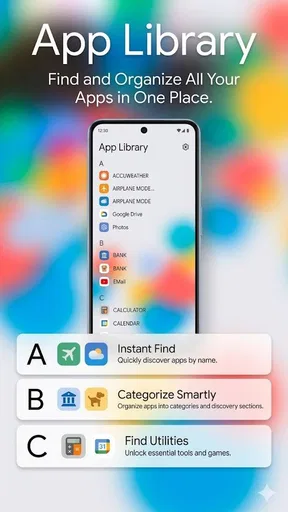
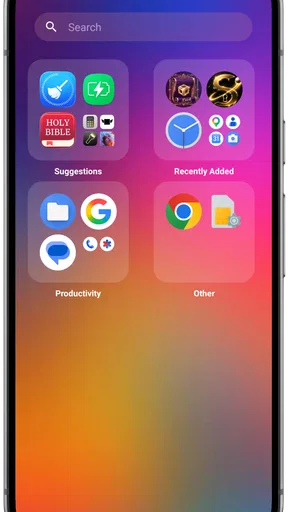
I particularly loved the ability to create widgets that actually look good. No more clunky, mismatched widgets ruining my home screen aesthetic. Plus, the app drawer is super organized, which makes finding apps a breeze.
Performance and Usability
Alright, so customization is cool and all, but how does it perform? I’m happy to report that it’s smooth sailing. I’ve been using it for a couple of weeks now, and I haven’t noticed any lag or crashes. It’s lightweight, which is a big win if you’re like me and you’ve got a ton of apps running simultaneously.
The gestures are another highlight. Swiping up for the app drawer or pinching to bring up the settings menu feels natural and intuitive. It’s like the app anticipates what you want to do next, making navigation a breeze.
How it fits alongside other launcher choices
Compared with staying on a phone’s default launcher, this is the more hands-on option: you can shape the grid and theme instead of accepting the manufacturer’s arrangement. That flexibility is worthwhile when the stock home screen feels cramped or visually impersonal. A simpler launcher may still be better if your priority is fewer choices, predictable behavior, or a screen that stays visually still.
There is also a useful distinction between changing the home screen and changing the whole phone. A launcher can influence the everyday route from the home screen to your apps, but it should not be treated as a universal accessibility solution. If you depend on a particular system-level behavior, test it directly after switching and keep the original setup available until you are confident the new arrangement works for you.
Small choices that make a difference
One practical trade-off is density. A packed grid can put more shortcuts within reach, but smaller targets may be harder to tap accurately. A more spacious layout is easier to scan and use, yet it can mean extra swiping to reach less-used apps. I’d choose based on the apps you open repeatedly, not on how many icons fit on one page.
Widgets deserve the same deliberate approach. They can make useful information visible without opening another app, but too many can crowd the area where you expect to find shortcuts. I’d keep only the widgets that genuinely save a step, then check whether the home screen still reads clearly at a glance. The goal is not a perfect theme; it is a layout that reduces friction in your own routine.
For a realistic test, imagine checking a message while carrying groceries or trying to open a map before crossing a busy street. In those moments, a familiar icon in a predictable place matters more than a clever visual effect. I’d put the most urgent tools in stable positions and avoid changing their locations just to match a new theme. That is especially helpful if more than one person occasionally uses the same phone.
What to expect before you settle in
The app is free, and its current version is 1.9.0; it runs on Android 9 or later. Those details make it relevant to a wide range of Android users, but the right decision still depends on how your device handles a replacement launcher and how comfortable you are changing your home-screen habits. The developer is Game Studio1314, and the app has 58 written reviews alongside its rating history.
As with any launcher, a smooth first impression is not the same as a perfect fit for every device or routine. I would give myself time to learn where settings and apps have moved, and I would avoid making major layout changes just before a day when I need to rely on the phone quickly. If a gesture feels awkward or is easy to trigger by mistake, use a more straightforward route where available rather than forcing yourself to adapt to it.
There is no single ideal setup for every user. Someone who enjoys visual customization may gladly spend time refining icons, widgets and wallpaper; someone who values consistency may see that same process as needless upkeep. I’d also be cautious about choosing motion purely because it looks striking. If it pulls your attention away from text or makes the screen uncomfortable to look at, a still, simpler appearance is the better choice.
Final Thoughts
If you’re in the market for a launcher that combines style with substance, this app is definitely worth checking out. It offers a smooth user experience, tons of customization options, and a sleek design that’s sure to impress. Whether you’re a customization newbie or a seasoned pro, there’s something here for everyone.
So, if you want to take your smartphone experience to the next level, give Cool Launcher Pro a shot. It might just become your new favorite app launcher. Happy customizing!
My inclusive verdict
My recommendation is a measured one: I’d try it if making the home screen your own sounds enjoyable, especially if you want to adjust icon scale, layout and overall visual character. I would not choose it solely on the promise of a more accessible phone, because a personalized interface only helps when its particular arrangement suits your vision, dexterity, attention and habits.
The most useful approach is to start with a calm, readable layout, keep important apps in familiar places, and judge the result during ordinary tasks rather than during setup alone. If that makes your phone easier and more pleasant to use, the customization has earned its place. If you find yourself hunting for icons, fighting motion or missing the predictability of your old screen, switching back is a sensible choice.
Pros
- Highly customizable themes and icons.
- Smooth and fast performance.
- Minimal battery consumption.
- User-friendly interface.
- Frequent updates with new features.
Cons
- Limited free features without purchase.
- Occasional ads in free version.
- Requires Android 6.0 or newer.
- Some features need internet access.
- No widget support in free version.
FAQs for Cool Launcher Pro
What features does Cool Launcher Pro offer?
Cool Launcher Pro provides a sleek interface with customizable themes, icon packs, and widgets. It enhances usability with gesture controls, a smart app drawer, and quick search functionality. Users can also enjoy minimal battery consumption and access to unique wallpapers. It's designed to improve both aesthetics and performance on your device.
Is Cool Launcher Pro compatible with all Android devices?
Cool Launcher Pro is compatible with most Android devices running version 5.0 (Lollipop) and above. However, performance may vary depending on your device's specifications. High-end devices will likely experience smoother transitions and faster loading times, while older models might encounter some limitations.
Does Cool Launcher Pro affect battery life?
Cool Launcher Pro is optimized for minimal battery consumption, making it a suitable choice for users concerned about battery life. The app is designed to be lightweight, ensuring that it doesn't drain resources unnecessarily. However, extensive use of certain features, like live wallpapers, may impact battery usage slightly.
Can I customize the Cool Launcher Pro interface?
Yes, Cool Launcher Pro offers extensive customization options. Users can personalize their home screens with a variety of themes, icon packs, and widgets. The app also supports gesture controls, allowing for a more intuitive and personalized user experience. These features make it easy to tailor the interface to your preferences.
Is there a cost associated with downloading Cool Launcher Pro?
Cool Launcher Pro typically offers a one-time purchase price, providing access to all its premium features without ongoing subscriptions. Occasionally, there might be discounts or promotions available. Users should check the app store for the most current pricing information to ensure they are getting the best deal.


